
Canceling a ChatGPT subscription should be simple, but many users find themselves clicking through multiple menus searching for the elusive cancel button. You’re not alone if you’ve spent ten minutes hunting for it. OpenAI didn’t exactly put a giant “Cancel” button on the front page.
The good news? Once you know where to look, the process is straightforward. This guide walks you through canceling ChatGPT Plus, Pro, or Business subscriptions across all platforms: web, iOS, and Android. We’ll also cover what happens after you cancel, how to request refunds, and troubleshooting tips for common issues.
What you need to know before canceling
Before diving into the steps, let’s cover some important details that will save you headaches later.
Where you subscribed matters most
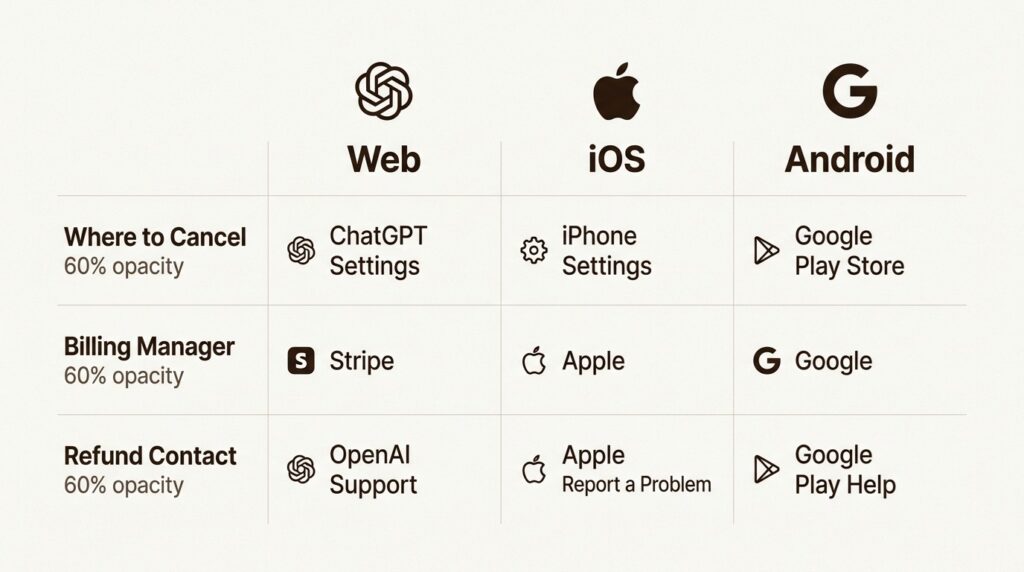
This is the single most important factor. Your cancellation method depends entirely on where you originally signed up:
- Web (chatgpt.com) Cancel through OpenAI’s website
- iPhone/iPad (App Store) Cancel through Apple’s subscription system
- Android (Google Play) Cancel through Google’s subscription system
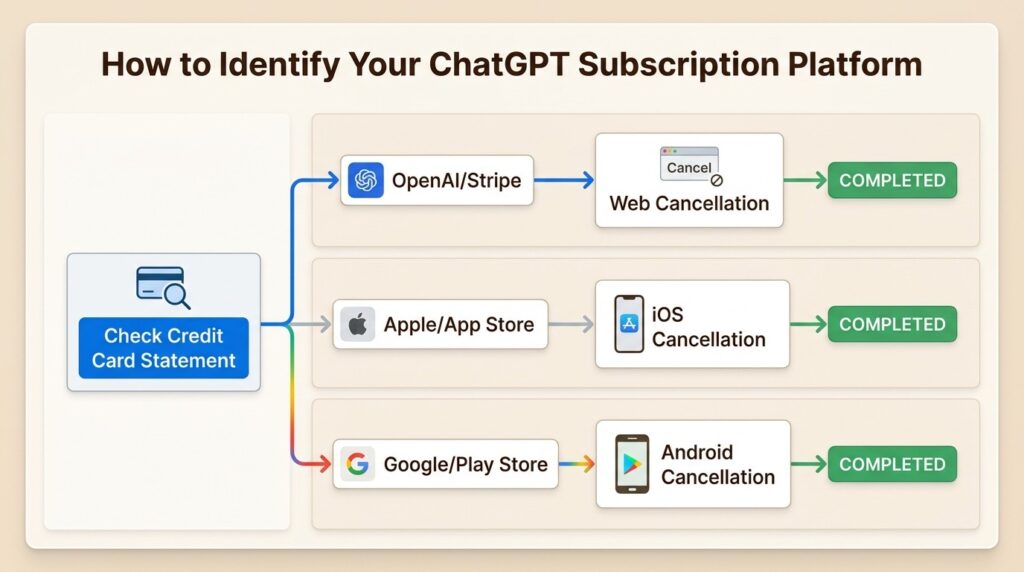
If you’re not sure which platform you used, check your credit card statement or email receipts. Look for “OpenAI” or “Stripe” (web), “Apple” (iOS), or “Google” (Android).
Timing your cancellation
Here’s what you need to know about billing timing:
- Cancel at least 24 hours before your next billing date to avoid charges
- Your cancellation becomes effective the day after your next billing date
- You keep full access until the end of your current paid period
- Subscription fees are generally non-refundable (with some exceptions we’ll cover)
Account deletion vs subscription cancellation
These are different actions with different consequences:
- Canceling subscription: Stops future billing, keeps your account and chat history
- Deleting account: Permanently removes everything, but also cancels web subscriptions
Important: Deleting your ChatGPT account does NOT cancel App Store subscriptions. You must cancel those through Apple separately.
How to cancel ChatGPT on the web
For subscriptions made directly on chatgpt.com, follow these steps:
Step 1: Log into your account
Go to chatgpt.com and sign in with the account that has the active subscription. Make sure you’re using the correct email address.
Step 2: Access your account settings
Click your profile icon in the top right corner of the screen. From the dropdown menu, select Settings.
Step 3: Navigate to subscription management
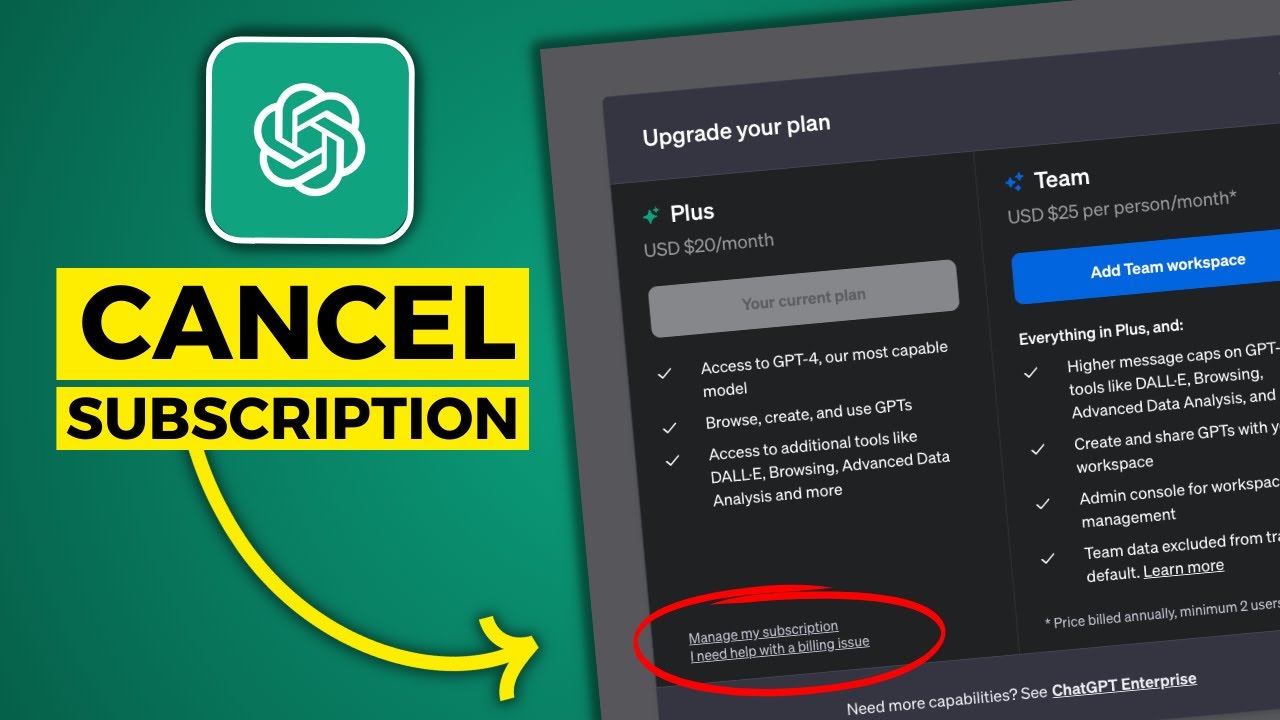
In the Settings panel, click the Account tab. Look for the dropdown menu labeled Manage and select it. Then choose Cancel Subscription from the options.
Step 4: Complete cancellation on Stripe
You’ll be redirected to Stripe’s billing portal (this is normal). Click Cancel Plan or Cancel Subscription, then confirm your choice when prompted.
Step 5: Verify your cancellation
After canceling:
- Take a screenshot of the confirmation page
- Check for a confirmation email (this may take a few hours)
- Log out and back in to confirm the Plus badge disappears from your profile
How to cancel ChatGPT on iPhone or iPad
For subscriptions made through the Apple App Store, you must cancel through Apple’s system, not OpenAI’s website.
Step 1: Open iPhone Settings
Open the Settings app on your device. Tap your name at the top (this opens your Apple ID settings).
Step 2: Access your subscriptions
Tap Subscriptions. You’ll see a list of all your active subscriptions.
Step 3: Find and cancel ChatGPT
Scroll through the list and tap on ChatGPT. Then tap Cancel Subscription. You might need to scroll down to find the cancel button.
Step 4: Confirm cancellation
Tap Cancel Subscription again on the pop-up to confirm. If you see an expiration message in red text instead of a cancel button, your subscription is already canceled.
Important notes for iOS users:
- Deleting the ChatGPT app does NOT cancel your subscription
- Deleting your ChatGPT account does NOT cancel App Store subscriptions
- Apple bills 24 hours before the subscription period ends
- For refunds, you must contact Apple directly at apple.com
How to cancel ChatGPT on Android
For subscriptions made through Google Play, cancel through Google’s system.
Step 1: Open Google Play Store
Open the Google Play Store app on your Android device. Tap your profile icon in the top right corner.
Step 2: Access subscriptions
Select Payments & subscriptions, then tap Subscriptions.
Step 3: Cancel ChatGPT
Find ChatGPT in your subscription list and tap it. Then tap Cancel subscription and follow the prompts to confirm.
Alternative: Cancel via web browser
You can also cancel through any web browser:
- Go to google.com/store/account/subscriptions
- Sign in with the Google account used for the subscription
- Click Manage next to ChatGPT
- Click Cancel subscription and select a reason
- Click Continue to confirm
Important notes for Android users:
- Uninstalling the ChatGPT app does NOT cancel your subscription
- Google Play manages billing, not OpenAI
- Contact Google Play support for refund requests
Troubleshooting common cancellation issues
Sometimes the cancellation process doesn’t go smoothly. Here are solutions to the most common problems.
Can’t find the cancel button
If you’re on the web and can’t locate the cancellation option:
- Try a desktop browser: Mobile browsers sometimes hide or misdisplay the Stripe portal
- Disable ad blockers: Extensions like uBlock Origin can block the cancel widget
- Use Incognito/Private mode: This bypasses cache and extension issues
- Clear browser cache: Old cached data can cause display problems
Don’t know which platform you used
If you’re unsure where you subscribed:
- Check your email for the original subscription confirmation
- Look at your credit card statement:
- “OpenAI” or “Stripe” = Web subscription
- “Apple” or “App Store” = iOS subscription
- “Google” or “Google Play” = Android subscription
- Try the web method first: If you see a “Manage Subscription” option in ChatGPT settings, you subscribed on the web
Lost access to your email address
If you can’t access the email associated with your account:
Option 1: Contact OpenAI support Provide them with: – The email address associated with the account – Last four digits of the payment card – Date of your most recent subscription payment
They can cancel the subscription on your behalf.
Option 2: Delete your account via Privacy Portal – Go to privacy.openai.com/policies – Submit a policy request to delete your account – This automatically cancels web subscriptions – Warning: This is permanent and can’t be undone
Cancel button is grayed out or missing
Try these steps:
- Refresh the page
- Try a different browser
- Check if your subscription is already canceled
- Contact OpenAI support if issues persist
No confirmation email received
Don’t panic if you don’t get an email immediately:
- Wait 3-4 hours (confirmation emails can be delayed)
- Check your spam/junk folders
- Your screenshot of the cancellation page serves as proof
- Monitor your bank statement to confirm no new charges appear
What happens after you cancel
Understanding the post-cancellation experience helps set proper expectations.
Access and features
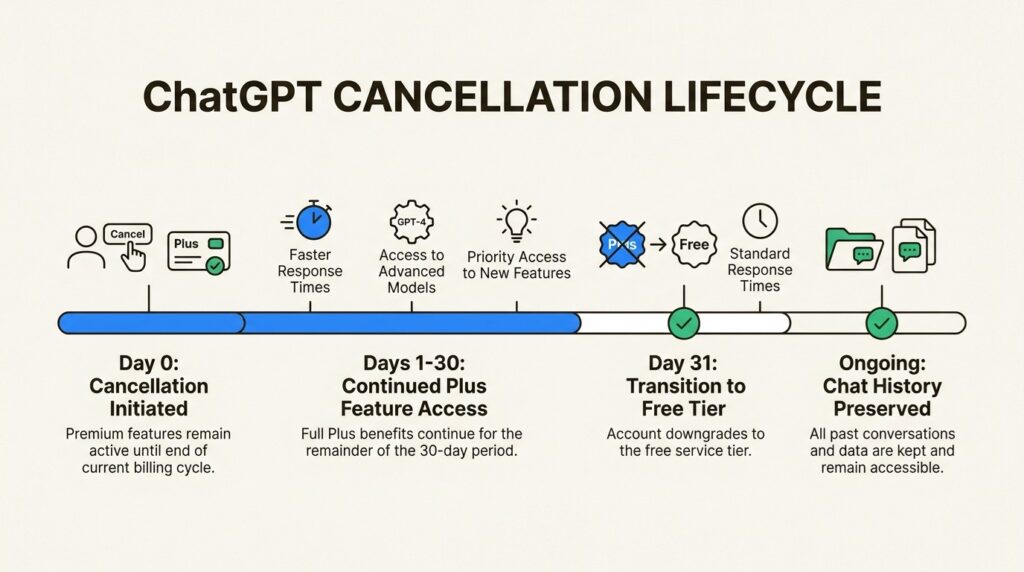
- You keep all Plus features until the end of your current billing period
- No immediate loss of functionality
- Your chat history and saved conversations remain intact
Billing
- No further charges after cancellation takes effect
- The cancellation becomes active the day after your next billing date
- If you canceled close to your billing date, you might see one final charge
Your account
- Your account remains active on the free tier of ChatGPT
- All your chat history is preserved
- You can resubscribe anytime by upgrading again
Data retention
OpenAI retains your account data according to their privacy policy. Canceling your subscription doesn’t delete your account or conversation history.
How to request a refund
Refund policies differ based on where you subscribed and your location.
Web subscriptions (OpenAI)
General policy: Subscription fees are non-refundable. However, exceptions exist:
- Accidental purchases: Generally eligible if you contact OpenAI within 14 days of the charge
- EU, UK, and Turkey residents: Eligible for a prorated refund if you cancel within 14 days of purchase
How to request:
- Log into openai.com with the same account that was charged
- Click the chat widget (bottom right corner)
- Request a refund through the chat
- The system will show your refund eligibility before connecting you to an agent
- If approved, refunds process within 5-7 business days
iOS subscriptions (Apple)
You must request refunds directly from Apple:
- Go to apple.com
- Sign in with your Apple Account
- Tap “I’d like to,” then choose “Request a refund”
- Select your reason, then choose Next
- Select ChatGPT, then choose Submit
Apple typically responds within 24-48 hours.
Android subscriptions (Google Play)
For Google Play subscriptions:
- Visit the Google Play Help Center
- Request a refund through their system
- Unused prepaid plans may be eligible for refund
Cancel your ChatGPT subscription with confidence
Canceling your ChatGPT subscription doesn’t have to be frustrating. Remember these key points:
- Web subscriptions: Cancel through ChatGPT settings (redirects to Stripe)
- iOS subscriptions: Cancel through iPhone Settings > Subscriptions
- Android subscriptions: Cancel through Google Play Store
- Timing: Cancel at least 24 hours before your billing date
- Documentation: Screenshot your cancellation confirmation
- Access: You keep Plus features until the end of your billing period
If you run into issues, don’t hesitate to contact the appropriate support team: OpenAI for web subscriptions, Apple for iOS, or Google for Android.
Managing subscriptions effectively is part of taking control of your digital services. Whether you’re canceling to save money, switch to a different AI tool, or simply don’t need the premium features anymore, you now have the knowledge to complete the process smoothly.
Frequently Asked Questions
Can I get a refund if I forgot to cancel my ChatGPT subscription before the renewal date?
For web subscriptions, OpenAI generally doesn’t offer refunds for forgotten cancellations. However, accidental purchases may be eligible if you contact support within 14 days. iOS and Android subscriptions have their own refund policies through Apple and Google respectively.
Will I lose all my chat history if I cancel my ChatGPT subscription?
No, your chat history remains intact when you cancel. You simply revert to the free tier of ChatGPT, which has some limitations but preserves your past conversations.
How do I know if I subscribed to ChatGPT through the website or the mobile app?
Check your email for the original subscription confirmation, or look at your credit card statement. Charges from ‘OpenAI’ or ‘Stripe’ indicate a web subscription. Charges from ‘Apple’ or ‘Google’ indicate a mobile app subscription.
Can I cancel my ChatGPT subscription without logging into my account?
For web subscriptions, you generally need account access. However, if you’ve lost access to your email, you can contact OpenAI support with your payment details, or delete your account through the Privacy Request Portal. For mobile subscriptions, you cancel through your phone’s settings without needing to open the ChatGPT app.
Why can’t I find the cancel button in my ChatGPT settings?
This usually means you’re subscribed through the App Store or Google Play, not directly through OpenAI. Check your phone’s subscription settings instead. Alternatively, try using a desktop browser, disabling ad blockers, or clearing your cache.
How long does it take for my ChatGPT cancellation to take effect?
Your cancellation becomes effective the day after your next billing date. You’ll continue to have Plus access until the end of your current paid period, even after canceling.

Pingback: How to Cancel a Ryze Subscription in 3 Simple Steps - Howtocancellab
Pingback: How to Cancel a Cirkul Subscription in 4 Easy Steps - How to Cancel Lab